Winter Forest Digital Paper Backgrounds: A Designer's Guide
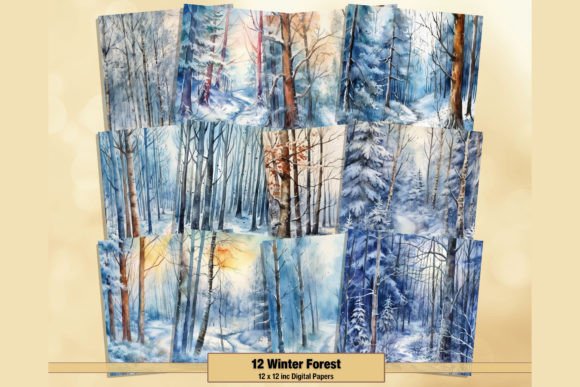
The right texture can transform a flat, digital project into something with tangible depth and emotion. When a design needs to evoke a specific season, mood, or atmosphere, the foundation you choose is critical. This is where a well-curated collection of digital papers becomes an invaluable asset. The Winter Forest Digital Paper Backgrounds set is a prime example, offering a palette of serene, snowy landscapes captured in high-resolution watercolor textures. It's more than just a pattern; it's a tool for building a complete visual narrative.
Capturing the Winter Aesthetic
At its core, this collection is about translating the quiet beauty of a snow-covered forest into a versatile design asset. The visual style is distinctly painterly, leveraging subtle watercolor textures to create soft, organic patterns. You won't find sharp, digital-looking lines here. Instead, expect gentle washes of color that mimic the way light filters through pine branches or the soft gradient of a winter sky at dusk. The personality of these papers is calm, nostalgic, and sophisticated. They feel handcrafted, which immediately lends a sense of authenticity and warmth to any project they touch.
The appeal lies in this balance between realism and artistic interpretation. The textures are detailed enough to suggest individual snowflakes on needles or the rough bark of a tree, yet abstract enough to function as a non-distracting background. This makes them a powerful choice for projects where the goal is to set a mood without overwhelming the primary content. The high-quality JPG files, delivered at 500 DPI or higher, ensure that these subtle details remain crisp and clear, even in large-format print applications.
Practical Applications for Creators and Brands
The true value of a design asset is measured by its versatility. The Winter Forest Digital Paper Backgrounds are not limited to a single niche. For crafters and hobbyists, they are the perfect canvas for seasonal projects. Imagine the texture of a handmade holiday card, the backdrop for a scrapbook page preserving family memories, or the layered pages of a junk journal. The instant download format means you can start creating immediately, integrating these professional-grade textures into your personal work.
For professionals, the applications expand significantly. Here’s where these assets become a strategic component of your design toolkit:
- Brand Identity & Marketing: A small business with a brand rooted in nature, wellness, or artisanal goods can use these papers to create a cohesive seasonal campaign. Think social media graphics for a winter sale, email newsletter headers, or website banners that instantly communicate a cozy, inviting atmosphere. They function as a sophisticated background for product photography or quote graphics, adding a layer of professionalism.
- Editorial & Web Design: Publishers and bloggers can use these textures to design captivating digital magazines, e-book covers, or blog post graphics. A travel blogger writing about a ski trip or a food blogger sharing holiday recipes can use a Winter Forest Digital Paper to frame their content, enhancing reader engagement and visual storytelling.
- Packaging & Print Design: For product-based businesses, these textures can inform the entire packaging design for a limited-edition winter collection. They can be used for gift wrap, box liners, tissue paper, or label backgrounds, creating a memorable unboxing experience that reinforces the brand's attention to detail and quality.
Integrating Textures into Your Design Workflow
Using a digital paper effectively requires more than just dropping it onto a canvas. It's about thoughtful integration. The first step is to consider the hierarchy of your design. A busy, high-contrast texture will fight for attention. The strength of the Winter Forest Digital Paper Backgrounds is their subtlety, which allows them to support, not compete with, your primary typography and imagery.
When pairing these backgrounds with type, contrast is key. A clean, modern sans serif font often works beautifully against the organic, soft watercolor, creating a balanced visual tension. For a more traditional or elegant feel, a classic serif font can echo the timeless quality of a winter scene. Avoid overly decorative script fonts or complex handwritten fonts, as their intricate details can become lost or create visual clutter against the textured background. Always test your font pairing at the intended size to ensure readability remains paramount.
Evaluate the project's needs. Is the background meant to be a full-bleed image, or a contained panel? For web design, consider using a subtle, tiled version or a large, optimized section to manage file size without sacrificing quality. For print, the high resolution is a significant advantage. Before committing, always test the texture with your core design elements—your logo, key headlines, and body copy—to see how they interact. This practical evaluation ensures the asset enhances your project's professionalism and contributes positively to the overall brand identity